

IPTV Schedule: How the EPG Works, Why Times Go Wrong, and the Fix Checklist (2026)
An IPTV schedule is the programme listing you see inside the “TV Guide” or “EPG” screen.
It tells you what’s live now, what’s next, and what’s coming later — organised by channel and time.
When it works well, it makes IPTV feel like normal television. When it’s broken (wrong times, missing shows, empty guide),
everything feels confusing even if streams play fine.
Your player displays it, but the source (provider/playlist/EPG feed) determines accuracy and completeness.
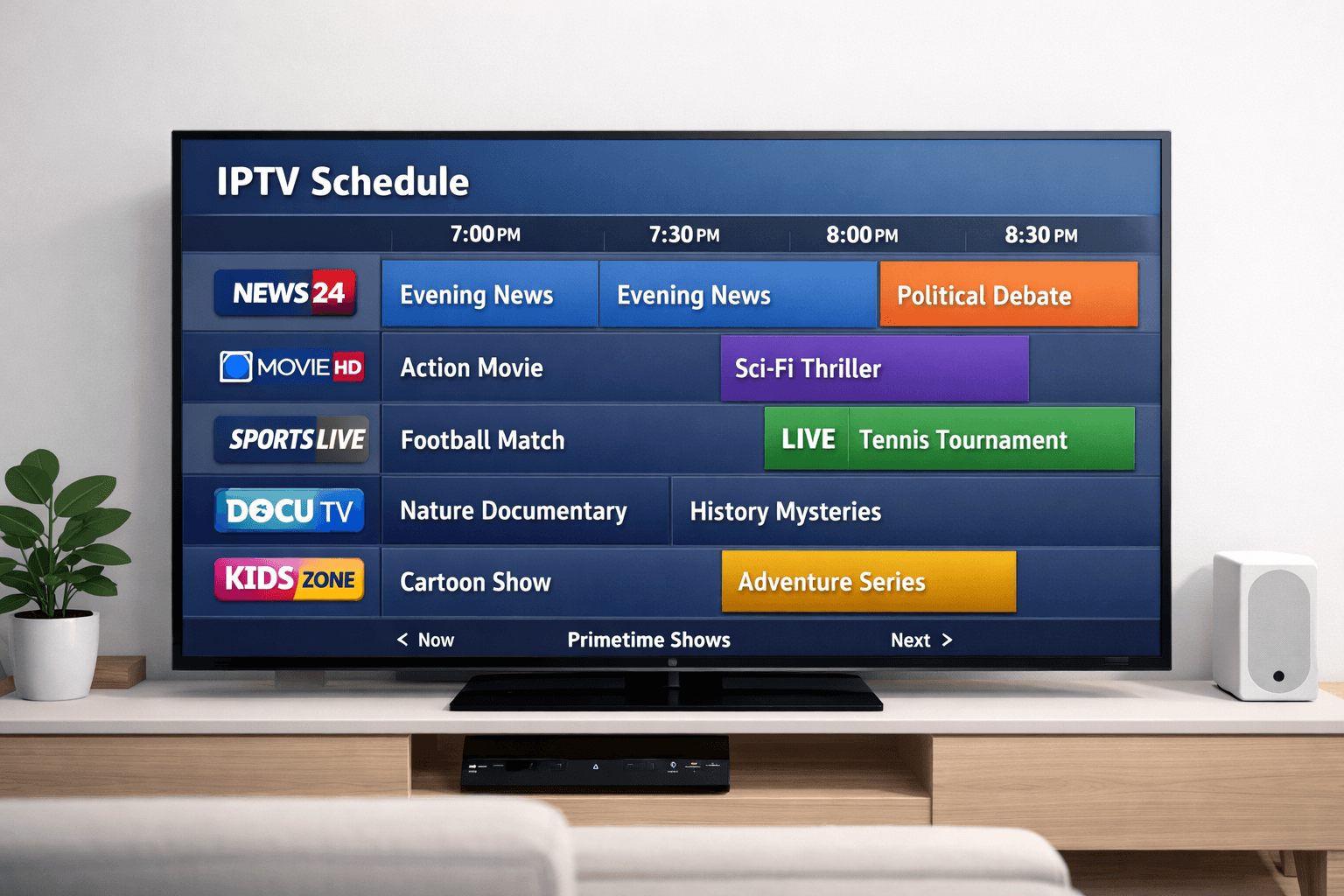
1) What an IPTV schedule actually is
An IPTV schedule is a digital programme listing organised by channel and time.
You usually access it by pressing “Guide” or “EPG” in your IPTV app.
It looks like a grid: channels down the left side and time blocks across the top.
The important part is this: the schedule is separate from streaming.
Streams can work perfectly while the schedule is empty or wrong — because the schedule relies on its own data feed.
Many viewers assume “EPG is broken, so the service is broken,” but the reality is more nuanced:
the video path (stream) and the guide path (EPG) are two different layers.
They often come from different sources and fail for different reasons.
If you’re still learning the difference between apps and providers, these short internal pages help:
2) EPG basics: where IPTV schedules come from
Most IPTV schedules are powered by an EPG (Electronic Program Guide).
The EPG is a structured dataset that describes:
- Channel identifiers (so the guide knows which listing belongs to which channel)
- Programme titles (what’s on)
- Start/end times (when it’s on)
- Descriptions and categories (optional)
- Time zone / offset data (sometimes embedded, sometimes handled by the app)
Many EPG feeds are delivered in a format commonly known as XMLTV.
Your IPTV player downloads that EPG feed, then matches it to your channel list.
If the player can’t match channels (wrong IDs), you can end up with a blank schedule even though the EPG file is technically valid.
Another common pattern: your playlist includes a hint to the EPG location.
Some playlists embed an EPG URL tag (often seen as an “EPG url” or “tvg-url” style entry).
Other times, you manually paste an EPG URL into the player settings.
Usually that means the EPG feed exists, but matching failed (IDs don’t align), or your player is stuck caching old data.
3) Why the schedule matters more than people think
Viewers often underestimate how much a good schedule improves daily usability.
The schedule isn’t just a “nice extra.” It’s the navigation layer that turns a huge channel list into something manageable.
In real households, a stable schedule helps with:
- Fast discovery: finding something to watch without guessing
- Planning: knowing what’s next before switching away
- Confidence: less “random clicking” and more predictable viewing
- Reducing frustration: especially for family members who want TV-like simplicity
For sports nights or time-sensitive viewing, the schedule is usually the difference between “it feels like TV” and “it feels like a messy app.”
Even if you mostly watch on-demand content, an accurate guide helps when you want to catch live events or follow a series schedule.
From a technical perspective, a good schedule is also a sign of maintenance.
Keeping schedules accurate requires regular data updates and correct channel mapping — which often correlates with better overall platform upkeep.
It’s not a guarantee, but it’s a useful signal.
4) How schedules load inside IPTV apps and players
At a high level, IPTV schedule loading works like this:
- Channel list loads from your playlist or service login
- EPG source is retrieved (downloaded from a URL or fetched via provider API)
- Player parses the data into a local database/cache
- Matching happens (channel IDs in the playlist must align with IDs in the EPG)
- Time conversion happens (player adjusts to your device time zone and DST rules)
- Guide renders as a grid, list, or “Now/Next” panel
Where things go wrong:
- Cache issues: the player keeps old guide data and refuses to refresh properly
- Matching issues: your channel list and EPG don’t share the same IDs
- Time issues: the device time zone, DST settings, or an app offset is incorrect
- Performance issues: the EPG file is huge and your device can’t process it quickly
Your “guide path” needs fixes (EPG source, mapping, time zone, cache).
5) The most common IPTV schedule problems
A) Empty schedule (EPG shows “No information”)
This is the most common complaint. Usually the EPG feed didn’t load, failed parsing, or didn’t match channels.
Sometimes the player is loading the EPG, but your channel list doesn’t have the identifiers the guide expects.
In that case, the guide can be “present” but effectively invisible.
B) Schedule is shifted by 1–3 hours (or more)
This almost always comes down to time conversion:
device time zone, daylight saving rules, or an offset setting inside the IPTV app.
If your guide is consistently ahead or behind, the data is probably fine — the display conversion is wrong.
C) Some channels have a guide, others don’t
That’s classic “partial matching.”
It can happen when some channels use proper IDs and others don’t, or when the EPG feed covers one region/bouquet but not another.
It can also happen when duplicate channels share similar names but different IDs.
D) Guide loads slowly / freezes the app
EPG data can be heavy. A large guide with lots of channels, logos, and long descriptions can overwhelm smart TVs or low-power boxes.
If the app becomes sluggish after enabling EPG, your first goal is to reduce EPG “weight” (shorter history, fewer channels, smaller data).
E) The schedule is outdated
Some players refresh EPG on a schedule (every X hours), others refresh on app open, and some require manual refresh.
If your guide never updates, check whether your player has an “Auto update EPG” option, and confirm it’s not blocked by DNS filtering or network restrictions.
6) Fix checklist: empty guide, wrong time, missing channels
Use this in order. It’s designed to avoid random guessing and get you to the root cause quickly.
Step 1 — Confirm your device time is correct
- On the TV/box, confirm time zone is set correctly (UK typically “London”).
- Enable automatic time if available.
- Restart the device after changing time settings.
If the device clock is wrong, the IPTV schedule will almost always look wrong even if the EPG is perfect.
Step 2 — Refresh EPG properly (don’t rely on “just reopening”)
- Find the player setting for EPG refresh/update and run it once manually.
- If there’s a “Clear EPG” or “Clear cache” option, use it before refreshing again.
- Close the app fully (not just back out) and reopen.
Many “blank schedule” issues are simply stale cache. Clearing and refreshing is the fastest win.
Step 3 — Check the EPG source is actually set
- If your setup uses an EPG URL: verify it’s entered correctly.
- If your playlist contains EPG tags: enable “Use playlist EPG” or “Auto detect EPG” if your player supports it.
- Try a single EPG source first (avoid stacking multiple EPG links until one works).
A playlist can load channels perfectly even if the EPG source is missing or wrong.
Step 4 — Fix time shift (guide is consistently ahead/behind)
- Look for an app setting like EPG offset, time shift, or time correction.
- Set it to 0 first, then adjust by 1 hour increments if needed.
- If your device time zone was wrong, correct that first and retest before applying offsets.
Offsets should be a last-mile adjustment, not a substitute for correct device time.
Step 5 — Solve partial schedules (some channels blank)
- Check whether your player supports manual EPG mapping (assigning EPG IDs to channels).
- If mapping is available, map one blank channel to a similar channel ID as a test.
- If mapping is not available, your best options are:
- Use a different EPG feed that matches your channel set
- Trim duplicates (remove repeated channels that confuse mapping)
- Switch to a player that supports mapping (for advanced users)
Step 6 — Improve performance (guide is slow / app freezes)
- Disable heavy extras first: large logos, extended descriptions, long catch-up history.
- Reduce channel groups if your playlist is massive.
- Prefer a dedicated streaming device if your smart TV struggles with heavy EPG data.
If you stream daily and want long-term stability, see:
IPTV box prices (tiers and what each tier usually includes).
If the guide is correct there, the problem is likely your TV/box app settings or cache — not the EPG itself.
7) Best practices for reliable schedules (UK-friendly)
Keep your setup simple until it’s stable
Most schedule problems get worse when people stack complexity:
multiple playlists, multiple EPG sources, multiple apps, and lots of “enhancement” toggles.
A better approach is:
get one playlist working, get one EPG source working, then add extras.
Use a stable network (the guide needs downloads too)
EPG data downloads in the background. If your Wi-Fi is unstable or your router is overloaded, the schedule can fail to update,
even if streams still play (because streams might be cached, adaptive, or using different endpoints).
If possible, use Ethernet for your main viewing device.
Expect occasional “data-side” changes
Channel line-ups and identifiers can change.
When providers update names or restructure channel groups, mapping can break and schedules can disappear for some channels.
This is one reason why “it worked last month” doesn’t always guarantee it will work today.
Your player may need a fresh EPG download and cache rebuild.
Choose schedule-first players for heavy TV use
If your main usage is live TV and you rely on the IPTV schedule every day, prioritise a player known for guide performance:
- Fast “Now/Next” browsing
- Reliable EPG updates
- Manual mapping for edge cases
- Good remote-control navigation
If you’re unsure which setup is usually the most stable, this internal guide is a strong starting point:
Best for IPTV (devices and setup choices that usually perform better).
8) How schedule quality differs by device
IPTV schedule performance often depends on device resources and app support.
Here’s how it commonly plays out:
Smart TVs
Smart TVs are convenient, but they’re not all equal.
Some have limited memory, slower processors, or weaker app store support over time.
If your guide is slow on a TV, it might not be the EPG itself — it might be the TV struggling to parse and render a large dataset.
In those cases, reducing EPG load can help, but a dedicated device can be the long-term fix.
Streaming devices / IPTV boxes
Modern streaming devices and higher-quality boxes tend to handle EPG better because they have more consistent CPU/RAM
and better update support. They also often provide stronger Wi-Fi and smoother UI performance.
If you watch live TV daily and depend on guide accuracy, this category is usually the easiest way to reduce frustration.
Mobile (phones/tablets)
Mobile devices are excellent for troubleshooting because they’re powerful and easy to refresh.
If your schedule is correct on mobile but broken on the TV, that’s a strong clue:
the EPG feed is probably fine, and the TV app needs cache/time settings fixes.
Desktop apps
Desktop apps vary widely. Some load EPG beautifully; others are minimal players with little guide support.
If you use desktop, focus on consistent EPG refresh and correct time zone handling.
9) FAQ
What is an IPTV schedule?
It’s the programme listing inside your IPTV app (usually the “Guide” or “EPG” screen) that shows what’s playing now
and what’s coming next, organised by channel and time.
Why are my IPTV schedule times wrong in the UK?
The most common reason is time zone or daylight saving conversion. First confirm your device time zone is correct (London),
then refresh the EPG. Only use app offsets if needed after the device time is correct.
Why does my guide show “No information” but channels still play?
Because streams and schedules are different layers. The guide depends on an EPG feed and correct channel matching.
Clear EPG/cache and refresh, then confirm the EPG source is set.
Do IPTV player apps provide schedules by default?
Some players include limited “Now/Next” data if your provider supplies it, but most schedules rely on an EPG feed.
The player displays the schedule; the source provides the data.
Does a VPN fix schedule problems?
Usually no. Most schedule issues are cache, time zone, or mapping problems.
A VPN can change routing, but it won’t correct incorrect EPG mapping or device time settings.
Is an IPTV schedule related to legality?
The schedule is just metadata. Legality depends on whether content distribution is authorised/licensed.
For a UK-focused overview, see:
Is IPTV legal? (UK).
10) External resources (safe)
Neutral, educational links only (no channel lists, no “where to buy streams” sources).